Accidentally deleted a bunch of photos after moving a file with auto-rename turned on #59


-
|
I moved a file which had numerous attachment paths in it, the auto rename function activated, then all of the old photos in that file were empty in the new file. |
Beta Was this translation helpful? Give feedback.
Replies: 5 comments 12 replies

-
|
Could you please provide more detail of you problem? I have trid to moved a markdown file with multi-linked images in version 0.8.3, the linked images was not empty. |
Beta Was this translation helpful? Give feedback.

-
|
Just to confirm, I went a commit back and used "checkout" to look at the files. |
Beta Was this translation helpful? Give feedback.
-
|
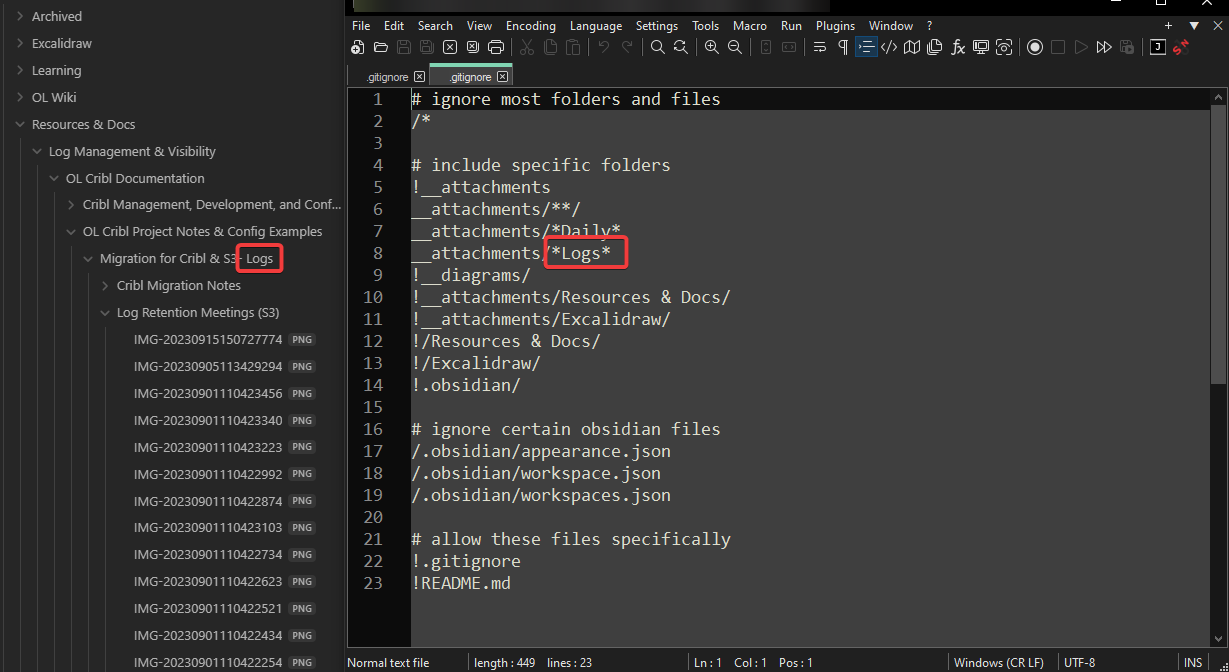
Okay I found the issue. it's the gitignore file. maybe I'll make an obsidian plugin to properly integrate with attachments and show what's being ignored. big sad |
Beta Was this translation helpful? Give feedback.
-
|
I'm still confused about why the images aren't showing up though. I've shown what i mean in the below notes |
Beta Was this translation helpful? Give feedback.
-
|
This might be an issue with attachment paths but I'm not sure. If you have any recommendations for obsidian plugins that make attachment paths more explicit then I'm all ears, but it seems obsidian isn't getting the image, despite "Show in system explorer" showing the actual image. |
Beta Was this translation helpful? Give feedback.
-
|
One last screenshot of what the image is linking to |

Beta Was this translation helpful? Give feedback.
-
I have some question nedd to ask. The The Rescources & Docs in this picture was the subfolder of __attachments ? If all this questoin was yes, the previers commited images will not be ignore, event you have updated |
Beta Was this translation helpful? Give feedback.
-
|
I can confirm that the __attachments folder had all the same path names as where the images were. The __attachments/**/ was actually ignoring the images. However, it's really the issue of how obsidian wasn't finding the image even though it seems that the path and everything was correct. |
Beta Was this translation helpful? Give feedback.
-
When you copy a images to a markdonw file in obsidian, the images will be named to So, if you press |
Beta Was this translation helpful? Give feedback.
-
|
It seems that the attachment in Obsidian and the disk part have matching names, so I'm not sure what's happening there.
|


Beta Was this translation helpful? Give feedback.
-
|
And the most important thing, this plugin will never delete your attachment, it just rename or move it. So if the attachment was exists but you can not see that in notes file, this should be happen if the attachment was renamed but this plugin (or obsidian, I'm using obsidian api to update link) has no updated the link of the notes. |
Beta Was this translation helpful? Give feedback.
-
|
I found the issue here once again. The issue is the max file path length in Windows. I'm not sure how to get around this without changing windows settings. Apparently UNC Path or the '\?' prefix can help, but I'm not sure of a way to have this and relative file paths at the same time. |
Beta Was this translation helpful? Give feedback.


I found the issue here once again. The issue is the max file path length in Windows. I'm not sure how to get around this without changing windows settings. Apparently UNC Path or the '\?' prefix can help, but I'm not sure of a way to have this and relative file paths at the same time.