███████╗███████╗██████╗ ██████╗ ██████╗     ██████╗  █████╗ ███╗   ███╗███████╗    ██████╗  ██████╗ ██╗  ██╗
██╔════╝██╔════╝██╔══██╗╚════██╗╚════██╗   ██╔════╝ ██╔══██╗████╗ ████║██╔════╝    ██╔══██╗██╔═══██╗╚██╗██╔╝
█████╗  ███████╗██████╔╝ █████╔╝ █████╔╝   ██║  ███╗███████║██╔████╔██║█████╗      ██████╔╝██║   ██║ ╚███╔╝
██╔══╝  ╚════██║██╔═══╝  ╚═══██╗██╔═══╝    ██║   ██║██╔══██║██║╚██╔╝██║██╔══╝      ██╔══██╗██║   ██║ ██╔██╗
███████╗███████║██║     ██████╔╝███████╗   ╚██████╔╝██║  ██║██║ ╚═╝ ██║███████╗    ██████╔╝╚██████╔╝██╔╝ ██╗
╚══════╝╚══════╝╚═╝     ╚═════╝ ╚══════╝    ╚═════╝ ╚═╝  ╚═╝╚═╝     ╚═╝╚══════╝    ╚═════╝  ╚═════╝ ╚═╝  ╚═╝
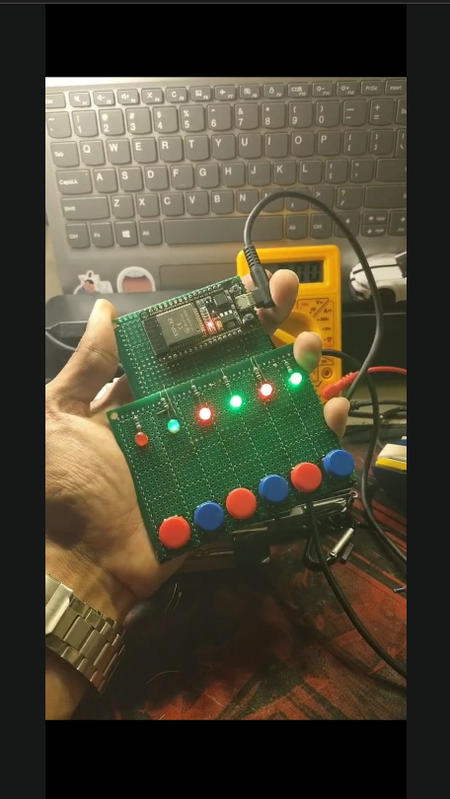
A web-based interactive gaming system built on ESP32 featuring 6 physical buttons and 6 LEDs, controlled through a beautiful mobile-responsive web interface. Perfect for parties, education, or just having fun!
- 6 Classic Games - Each with unique gameplay mechanics
- Web-Based Interface - No app installation required
- Real-Time Monitoring - Debug panel for hardware testing
- Wireless Control - Access via WiFi on any device
- Beautiful UI - Modern, gradient-based design with smooth animations
- Standalone System - ESP32 creates its own WiFi access point
Remember and repeat increasingly complex LED sequences. One mistake and you're out!
Hit the lit LED as fast as you can. Miss or hit the wrong button and lose points!
Find matching LED pairs based on position patterns. Test your memory skills!
How fast are your reflexes? Hit the correct button when the LED lights up to score points.
Memorize and recreate LED patterns as quickly as possible. Accuracy is key!
Catch the moving light by pressing the button at just the right moment!
- ESP32 Development Board (any variant)
- 6x Push Buttons (normally open, momentary)
- 6x LEDs (any color, 5mm recommended)
- 6x 220Ω Resistors (for LEDs)
- Breadboard and Jumper Wires
- Power Supply (USB or 5V adapter)
| Component | GPIO Pins |
|---|---|
| Buttons | 19, 18, 21, 22, 23, 33 |
| LEDs | 12, 13, 25, 26, 27, 32 |
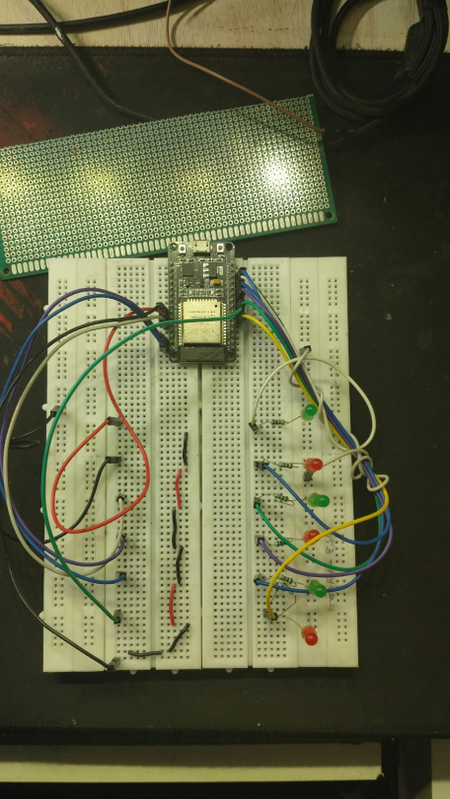
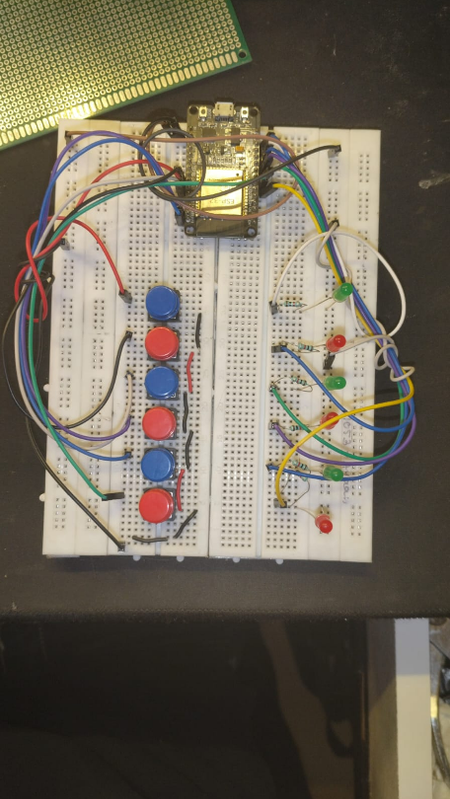
Button Wiring: Connect buttons between GPIO pins and GND (using internal pull-up resistors)
LED Wiring: Connect LEDs through 220Ω resistors to GPIO pins (anode to GPIO, cathode to GND)
- PlatformIO (recommended) or Arduino IDE
- ESP32 Board Package
- Libraries (auto-installed with PlatformIO):
WiFi.h(included with ESP32 package)WebServer.h(included with ESP32 package)
esp32-game-box/
├── src/
│   └── main.cpp          # Main source code
├── platformio.ini        # PlatformIO configuration
└── README.md            # This file
-
Install PlatformIO
- Install VS Code
- Install PlatformIO extension from VS Code marketplace
-
Setup Project
# Clone the repository
git clone https://github.com/urcauz/esp32-game-box.git
cd esp32-game-box

# PlatformIO will auto-install dependencies
-
Configure platformio.ini (if not already present)
[env:esp32dev]
platform = espressif32
board = esp32dev
framework = arduino
monitor_speed = 115200
-
Upload to ESP32
- Connect ESP32 via USB
- Click "Upload" button in PlatformIO toolbar
- Or use command:
pio run --target upload
-
Install Arduino IDE
- Download from arduino.cc
-
Add ESP32 Board Support
- Open Arduino IDE
- Go to
File→Preferences - Add to "Additional Board Manager URLs":
https://raw.githubusercontent.com/espressif/arduino-esp32/gh-pages/package_esp32_index.json - Go to
Tools→Board→Boards Manager - Search "ESP32" and install "esp32 by Espressif Systems"
-
Upload the Code
- Rename
src/main.cpptomain.ino(Arduino IDE requires .ino extension) - Open the
.inofile in Arduino IDE - Select your ESP32 board:
Tools→Board→ESP32 Arduino→ (your board) - Select the correct port:
Tools→Port - Click Upload button
- Rename
- Power on your ESP32
- Connect to WiFi network:
ESP32-GameHub - Password:
game1234 - Open browser and navigate to:
http://192.168.4.1
Two options available:
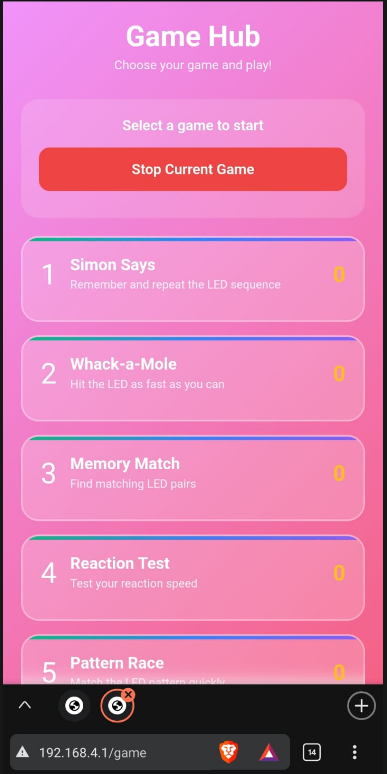
- Play Games - Access the game selection screen
- Monitor & Debug - Real-time hardware testing interface
- Select a game from the game hub
- Game starts automatically
- Physical buttons control gameplay
- Watch your score increase on the web interface
- Press "Stop Current Game" to end
- View real-time button states
- Toggle LEDs individually
- Test hardware connectivity
- Perfect for debugging and setup
Edit these lines in src/main.cpp to change network credentials:
const char* ssid = "ESP32-GameHub";      // Network name
const char* password = "game1234"; // Network passwordModify these arrays to change GPIO assignments:
const int BTN_PINS[NUM_BTNS] = {19, 18, 21, 22, 23, 33};
const int LED_PINS[NUM_LEDS] = {12, 13, 25, 26, 27, 32};Adjust timing parameters in individual game update functions to modify difficulty.
- Optimized for mobile phones and tablets
- Works on any modern browser
- Touch-friendly controls
- No installation required
- Real-time score updates
- Live game status
- Hardware state visualization
- Beautiful gradient animations
- Ensure ESP32 is powered on
- Check if "ESP32-GameHub" network appears
- Try forgetting the network and reconnecting
- Verify password is correct:
game1234
- Check resistor values (220Ω recommended)
- Verify LED polarity (long leg = anode)
- Test in Monitor mode to isolate issues
- Confirm GPIO pin assignments
- Ensure buttons are wired to GND correctly
- Check for loose connections
- Test individual buttons in Monitor mode
- Verify internal pull-ups are enabled (they are by default)
- Confirm IP address is
192.168.4.1 - Try different browser
- Clear browser cache
- Check serial monitor for errors
- Ensure correct board selected in
platformio.ini - Try holding BOOT button during upload
- Check USB cable (use data cable, not charge-only)
- Verify correct COM port selected
PlatformIO: Click "Monitor" button or run pio device monitor
Arduino IDE: Open serial monitor (115200 baud)
You'll see:
- WiFi AP status
- IP address confirmation
- HTTP server status
- Connection logs
The system provides REST API endpoints:
GET /- Main menuGET /game- Game selection interfaceGET /monitor- Hardware monitor interfaceGET /api/status- System status JSONPOST /api/led- Control individual LEDsPOST /api/start-game- Start a gamePOST /api/stop-game- Stop current game
- Add sound effects with a buzzer
- Implement difficulty levels
- Create multiplayer modes
- Add score persistence with EEPROM
- Design custom enclosure
- Add RGB LEDs for color effects
- Create tournament mode
- Add OLED display for scores
- Implement web-based leaderboard
This project is open source and available under the MIT License.
Contributions, issues, and feature requests are welcome! Feel free to check issues page.
urcauz
GitHub: @urcauz
- Built with ESP32 Arduino Core
- Inspired by classic arcade games
- UI design influenced by modern web trends
- Powered by PlatformIO
Enjoy gaming with your ESP32! 🎮✨
If you found this project helpful, please consider giving it a ⭐!