- Use custom data classes in a view controller.
- Use
IBActions to trigger methods on view controllers, andIBOutletsto set labels with output strings. - Use the
AVAudioPlayerclass to play audio files.
In this lab, you're going to hook up some audio files to a view controller that will allow a user to select a song from a list and playback the associated audio track. First, you're going to set up the data models for holding the information at run time. Then, you'll connect the data models to a view controller than will make the songs interactive to the user.
There are two classes that you will need to set up according to the provided test files, FISSong and FISPlaylist. The FISSong class is simply a data model for holding title, artist, album, and filename information for an mp3 file. The FISPlaylist class contains an array of songs, and will need to be set up with some methods for sorting and accessing the information in that array.
-
Create the class files for
FISSong. It should inherit fromNSObjectand contain four string properties calledtitle,artist,album, andfileName. -
Declare a designated initializer that covers these four properties in that order.
-
Override the default initializer to call the designated initializer with empty strings submitted as all four arguments. Verify that the tests for
FISSongpass before moving on.
1 — Create the class files for FISPlaylist. It should inherit from NSObject and contain two properties, a mutable array called songs and a string called text. Declare the following methods:
sortSongsByTitlewhich provides no return,sortSongsByArtist, which provides no return,sortSongsByAlbum, which provides no return, andsongForTrackNumber:which takes oneNSUIntegerargument and returns aFISSongobject.
Define the methods to default implementations and run the tests.
2 — Override the default initializer. It should set the songs array to the result of the following `generateSongObjects method below (we'll save you some typing):
- (NSMutableArray *)generateSongObjects
{
    NSMutableArray *songs = [[NSMutableArray alloc] init];

    [songs addObject:[[FISSong alloc] initWithTitle:@"Hold on Be Strong"
                                             artist:@"Matoma vs Big Poppa"
                                              album:@"The Internet 1"
                                           fileName:@"hold_on_be_strong"] ];

    [songs addObject:[[FISSong alloc] initWithTitle:@"Higher Love"
                                             artist:@"Matoma ft. James Vincent McMorrow"
                                              album:@"The Internet 2"
                                           fileName:@"higher_love"] ];

    [songs addObject:[[FISSong alloc] initWithTitle:@"Mo Money Mo Problems"
                                             artist:@"Matoma ft. The Notorious B.I.G."
                                              album:@"The Internet 3"
                                           fileName:@"mo_money_mo_problems"] ];

    [songs addObject:[[FISSong alloc] initWithTitle:@"Old Thing Back"
                                             artist:@"The Notorious B.I.G."
                                              album:@"The Internet 4"
                                           fileName:@"old_thing_back"] ];

    [songs addObject:[[FISSong alloc] initWithTitle:@"Gangsta Bleeding Love"
                                             artist:@"Matoma"
                                              album:@"The Internet 5"
                                           fileName:@"gangsta_bleeding_love"] ];

    [songs addObject:[[FISSong alloc] initWithTitle:@"Bailando"
                                             artist:@"Enrique Iglesias ft. Sean Paul"
                                              album:@"The Internet 6"
                                           fileName:@"bailando"] ];

    return songs;
}
3 — Write some code that sets up the text property. Think about where this belongs -- you'll need to call it after the songs array is initialized. It should format the information in each song in the songs arrays to match the following format:
1. (Title) Hold on Be Strong (Artist) Matoma vs Big Poppa (Album) The Internet 1\n
Don't forget the newline character at the end of the line.
4 — Write the implementations for the sorting methods. Each method should reorder the songs in the songs array and update the string in the text property.
sortSongsByTitleshould sort the songs array alphabetically ascending by title, and secondarily by artist.sortSongsByArtistshould sort the songs array alphabetically ascending by artist, and secondarily by album.sortSongsByAlbumshould sort the songs array alphabetically ascending by album, and secondarily by title.
5 — Write the implementation for songForTrackNumber:. It should return the song from the songs array at the correct track number (which begins at 1, unlike indexes). If the argument is not a valid track number, this method should return nil.
All the tests for FISPlaylist should now pass.
The storyboard file contains an empty view controller. Add and connect two UIButtons that will "play" and "stop" an audio file, a UITextField for collecting a song number from the user, and a UITextView for displaying the playlist's contents to the user. You might lay them out something like this:
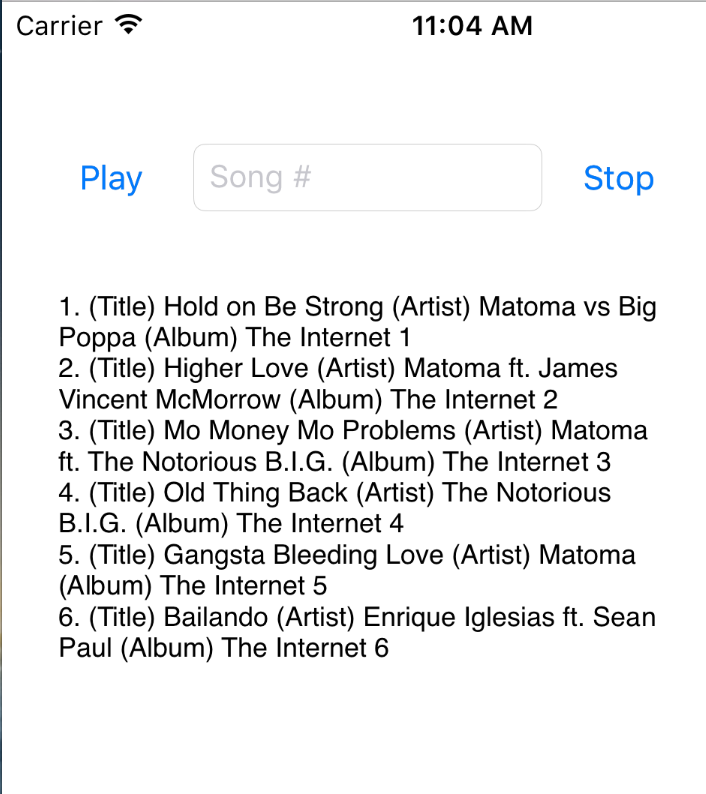

-
Create a subclass of
UIViewControllercalledFISJukeboxViewController. -
Add a
FISPlaylistproperty calledplaylist. Connect the text field and text view properties to the class file, and connect the "play" and "stop" buttons to actions. -
In the
viewDidLoadmethod (after a call to[super viewDidLoad]), set theplaylistproperty to a default instance ofFISPlaylist. Set the textview'stextproperty to theplaylist's text property. -
The basic flow of the app is the user can put in a number in the
UITextFieldthat corresponds to a song in the song listing and then hit play and that song will be played. For the first version of the app, justNSLog()the information of the song to be played. -
Now add three more
UIButtons to the view controller's canvas in the storyboard file. They should be titleTitle,Artist, andAlbum. Connect them to the view controller's class file. They should tell theplaylistproperty to sort its songs according the respective method. Don't forget to update the text view after the order of the songs is changed!
Once the NSLog()s are working, you can set up an audio player to actually play the music! There are a few steps needed to get audio working:
- Import the
AVFoundationlibrary by writing#import <AVFoundation/AVFoundation.h>in your view controller. - Add an
AVAudioPlayerproperty calledaudioPlayer. - Copy this method into the view controller's implementation:
- (void)setUpAVAudioPlayerWithFileName:(NSString *)fileName
{
    NSURL *url = [[NSBundle mainBundle] URLForResource:fileName withExtension:@"mp3"];
    NSError *error = nil;
    self.audioPlayer = [[AVAudioPlayer alloc] initWithContentsOfURL:url error:&error];
    if (!self.audioPlayer)
    {
        NSLog(@"Error in audioPlayer: %@",
              [error localizedDescription]);
    } else {
        [self.audioPlayer prepareToPlay];
    }
}-
Rewrite the implementation for the "Play" button's IBAction. Use the
songForTrackNumber:method get the song object for a digit entered by the user in the text field. To prepare a song to be played, callsetUpAVAudioPlayerWithFileName:with the song'sfileName. Then, to actually pay the song, call theaudioPlayer'splaymethod. -
Now write the implementation for the "Stop" button's IBAction to call the
stopmethod on theself.audioPlayerobject. -
Run your jukebox in the simulator. Select a song to play and listen to your sound system churn out a sweet tune! (Top-tip: Make sure your volume is on, but at a moderate level.)
View (advanced) Jukebox Views on Learn.co and start learning to code for free.